Apple Vision Pro: 17 Features That Make It the World's Most Advanced Headset
Vinayak SP
2/05/2026
You know that feeling when you put on your first pair of glasses and the whole world suddenly gets crisp and clear? Now imagine that same "wow" moment, except instead of just seeing better, you can pop open a massive 100-inch cinema screen floating in your bedroom, video call your friends so they appear right beside you in full 3D, and scroll through apps using nothing but a tiny finger pinch. That's the Apple Vision Pro spatial computing headset — a device that wants to replace your laptop, TV, gaming console, and creative studio all at once. Apple has always had a talent for changing how we use technology, and if you've ever read about Apple's game-changing iPhone X features that redefined smartphones for a generation, you already know this company doesn't do anything halfway.
Apple's AR/VR Headset —
The Apple Vision Pro AR/VR headset is powered by the blazing-fast Apple M2 chip combined with the all-new Apple R1 chip — a dedicated processor that handles camera, sensor, and microphone data in just 12 milliseconds. That's faster than the human eye can blink. It runs visionOS, Apple's first spatial operating system, built completely from scratch to handle this new kind of personal computing. With the whole tech world buzzing about the latest AI breakthroughs and how they're changing the way we work and create, Vision Pro fits right at the intersection of artificial intelligence and everyday human needs.
In this guide, we're going to break down all 17 features of Apple Vision Pro — updated, explained clearly, and written in plain school-level English. Whether you're a hardcore tech fan or just someone who wants to know what all the fuss is about, this post has you covered. Grab a snack. Let's dive right in.
Apple Vision Pro packs more technology into a single wearable device than most of us thought was possible. It features stunning ultra-high resolution micro-OLED displays, a redesigned spatial audio system, precise eye tracking and hand tracking, full voice control with Siri, an external battery pack, a lightweight and comfortable build, and a fast-growing library of apps. It is easily the most advanced personal wearable computer ever built.
The Apple Vision Pro mixed reality device is the perfect tool for anyone who wants to feel what the future of personal computing actually looks like. Whether you're a creative professional, a remote worker, a student, a gamer, or just someone who loves watching movies in an extraordinary way, this device has something real to offer.
It is a truly powerful tool for creativity, productivity, and entertainment. With Vision Pro, the range of what you can do is almost endless.
Here are some of the things you can do with Vision Pro:
Play 3D spatial games that fill your entire room
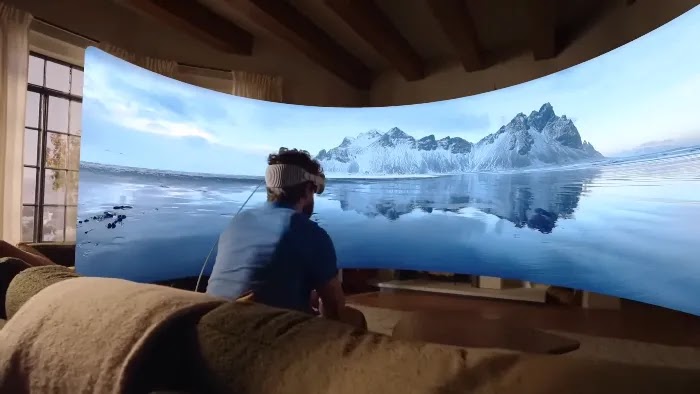
Watch movies and TV shows on a virtual 100-inch cinema screen
Create and edit 3D spatial content with your bare hands
Learn new skills through interactive spatial educational experiences
Stay connected with friends and family through FaceTime Personas
Work smarter with a virtual Mac Virtual Display up to 4K resolution
Capture and relive memories as spatial photos and spatial videos
And so much more!
Apple Vision Pro is the future of personal computing. It is a powerful tool that helps you do more, be more, and experience more in ways that were once only possible in science fiction movies.
In addition to these features, Vision Pro also brings advanced eye tracking, hand tracking, voice control, solid battery performance, comfort-focused design, and a rich app ecosystem. With its combination of features and raw power, it is the most advanced personal electronics device available today. The future of computing is here.
Apple Vision Pro is the world's first spatial computer that merges digital content with your real-world environment. Powered by the Apple M2 and R1 chips, it delivers a totally new visual and audio experience unlike anything before it. This device sets a brand-new standard for personal computing, creative work, entertainment, and remote collaboration.
17 Features of Apple Vision Pro
Apple Vision Pro features and specifications represent the next generation of personal computing, offering strong solutions for improving productivity, personal growth, and life experiences. With advanced features built into every layer of the hardware and software, Vision Pro helps you achieve more, be more successful, and enjoy a more fulfilling digital life. Here are the features that make Vision Pro so advanced.
Know Apple Vision Pro features that will blow your mind (explained simply):
1. Ultra-High Resolution Display
Apple Vision Pro uses custom micro-OLED displays that pack more pixels per eye than a 4K TV, delivering extraordinary visual clarity in every scene. With support for high dynamic range and wide color gamut technology, every color looks vivid, every detail appears razor-sharp, and every scene feels completely real — setting a whole new standard for personal displays.
The Vision Pro features a pair of custom micro-OLED displays that deliver visuals so sharp and detailed, you would think you were looking through a real window — not a screen. With more pixels per eye than a 4K TV, the level of clarity is something you genuinely have to see to believe.
Together, both displays push out a combined total of 23 million pixels — which, to give you some perspective, is more than most professional monitors you'd find at a high-end video production studio. These displays also support high dynamic range (HDR) and wide color gamut (WCG), meaning colors are more vivid, shadows are richer, and bright highlights pop with intensity. If you want to understand why visual quality optimization matters so much in digital content, Vision Pro's display is the perfect real-world example.
Apple also built a custom three-element lens system for Vision Pro that keeps the image sharp no matter where you look — center or edges. And a special display calibration feature in visionOS adjusts the output to match your specific eye characteristics. That's right — the screen is literally tuned to your eyes.
2. Lightweight and Comfortable Design
Apple Vision Pro is designed to be comfortable to wear for long periods of time. Its outer shell is a single piece of laminated glass that curves smoothly into a lightweight aluminum alloy frame. This design isn't just about good looks — it's about spreading the weight evenly so your nose and forehead don't feel like they've run a marathon after 30 minutes.
When you look at the evolution of smartphone and wearable device design over the years, Vision Pro represents a clear leap forward in how premium tech is built to be worn. It comes with two headband options — the Solo Knit Band for a single-strap setup and the Dual Loop Band for extra security during active use. A soft Light Seal molds gently to your face to block out stray light without putting pressure on your skin.
For glasses wearers, Apple partnered with ZEISS to create ZEISS Optical Inserts — custom prescription lenses that magnetically clip inside the headset. So whether you have 20/20 vision or thick-rimmed spectacles, you get the full, crystal-clear Apple Vision Pro experience either way.
3. Spatial Audio
The Vision Pro features a completely rebuilt spatial audio system that wraps sound around you from every direction. This isn't just standard left-right stereo — it's a full 360-degree soundscape where audio comes from wherever it should actually be in the real world. If a helicopter flies past in a movie, you'll hear it move through the actual air around you.
Apple Vision Pro places small speakers just outside your ears so sound enters naturally, like real-world audio. The feature called Personalized Spatial Audio goes even further — it uses your iPhone's TrueDepth camera to actually scan the shape of your ears, then adjusts the audio output specifically to your unique ear anatomy. Nobody else in the world hears it quite the way you do. If you own AirPods Pro, they work beautifully alongside Vision Pro for an even richer audio output.
Whether you're watching a blockbuster film, deep inside a game, or sitting in a virtual meeting, Apple Vision Pro spatial audio makes every moment feel present and real. It's the audio equivalent of sitting inside the action.
4. 3D Spatial Camera
Apple Vision Pro is Apple's first device with a built-in 3D spatial camera. You can use it to capture spatial photos and spatial videos — essentially memories recorded in full three dimensions. When you play them back inside the headset, it genuinely feels like you're physically back inside that moment. A birthday party. A concert. A trip abroad. It's the closest thing we currently have to a time machine.
The Apple Vision Pro 3D camera records spatial video in 180-degree immersive resolution. Apple TV 4K also supports spatial video playback, so even without the headset, your 3D memories can look incredible on your living room TV. To truly get the most out of high-resolution spatial media, it helps to know about the best video quality formats for high-resolution digital content.
You can also share your spatial photos and videos directly with anyone who has a Vision Pro or a compatible Apple device. Imagine sending someone a 3D memory of a special moment — and them feeling like they were actually standing there right beside you. That's not science fiction anymore. That's Vision Pro.
5. Eye Tracking and Optic ID
The Vision Pro uses high-precision eye tracking technology to control your entire user experience without you lifting a single finger. You look at a menu — it highlights. You look at an app — it responds. The headset has infrared cameras and LED lights inside that map your eye movements with extraordinary accuracy, letting you "click" on anything just by looking at it.
But here's where it gets even cooler. Vision Pro uses a groundbreaking biometric security system called Optic ID. Just like Face ID reads your face or Touch ID reads your fingerprint, Optic ID scans your iris pattern to instantly unlock the headset and authorize purchases. Your iris is as unique as your DNA, and all Optic ID biometric data is stored encrypted on the device — never sent to Apple's servers. Compared to older Android tracking and mobile security methods, this represents a major step forward in personal device authentication.
Eye tracking also powers a clever performance feature: Vision Pro renders the area you're looking at in maximum detail while reducing processing on everything in your peripheral vision. Sharp where you need it, smart everywhere else.
6. Hand Tracking
Apple Vision Pro tracks your hand movements and finger gestures with pinpoint accuracy using advanced cameras and sensors built directly into the headset. You can tap, flick, drag, scroll, and interact with digital objects naturally — no controllers, no gloves, no buttons required. Just your hands, doing exactly what hands were always made to do.
The Vision Pro tracks your hand gestures and finger movements using multiple cameras and depth sensors mounted on the headset. Zero controllers. Zero gloves. Just your bare hands moving naturally while the headset tracks every micro-movement with remarkable precision.
The main input gesture is a simple pinch — touch your thumb and index finger together to "select" or "click." You can also flick, drag, zoom, and scroll with natural two-handed movements. When Android gesture navigation controls were introduced a few years ago, people thought that was the future of mobile control. Vision Pro's hand tracking takes that entire concept and raises it by several levels.
You can even rest your hands in your lap and still interact with apps on the headset. The Apple Vision Pro hand tracking system detects fingertip movements from a comfortable resting position, so you don't need to hold your arms up the whole time like you're conducting an orchestra. It keeps getting smarter with every visionOS update too.
7. Environments
Tired of staring at your office walls? Apple Vision Pro lets you swap them out entirely with beautiful visionOS digital environments that change what you see around you. A calm mountain meadow. A quiet beach at sunset. A serene Japanese forest. All of these are available as virtual surroundings you can place yourself inside while still using your apps normally.
You control how much of the environment you see using the Digital Crown dial on the side of the headset. Turn it up all the way and you're fully surrounded by the virtual world. Turn it down and your real room comes back. You decide how much reality you want at any given moment. If you're a content creator curious about how spatial environments open up new opportunities, these creative video content ideas might inspire your next spatial project.
Apple continues to add new environments through visionOS software updates. Recent fan-favorites include a peaceful Mount Hood meadow, an ocean voyage on the traditional Hōkūleʻa canoe, and stunning Yosemite-inspired outdoor settings. Your daily commute to the couch just got a whole lot more scenic.
8. Voice Control with Siri
Apple Vision Pro supports full voice control through Siri. Just say "Hey Siri" and your personal assistant snaps to attention. You can open apps, send messages, set reminders, search the web, play music, adjust settings, and control media playback — all without raising a finger.
Siri on visionOS works differently from Siri on your iPhone. It can interact directly with spatial apps, control system-level settings, and even help with form inputs or text editing inside VR environments. Voice commands are especially useful when your hands are occupied — like when you're watching a recipe tutorial or working through a hands-on training app.
Voice dictation is also fully supported, so you can speak your emails, messages, and documents instead of typing them on a virtual keyboard. In a world where your digital presence and visibility matter more than ever, being able to create and manage content entirely by voice is a serious productivity advantage.
9. Multitasking
Apple Vision Pro provides an infinite canvas for multitasking, letting you run multiple apps side by side, resize them freely, and place them anywhere in your physical space. Whether you are managing work projects, watching a show, or messaging colleagues, Vision Pro turns your entire room into one giant interactive workspace for maximum daily productivity.
Apple Vision Pro hands you an infinite multitasking canvas. You can have multiple apps open at the same time, pin them in different spots around your room like floating screens, and resize each one to any size you want. Email on the left, a YouTube video on the right, your calendar hovering above — all at once, no juggling required.
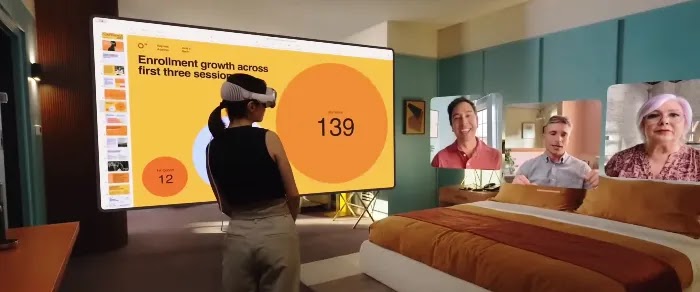
The Mac Virtual Display feature is an absolute game-changer for professionals. It lets you bring your Mac's screen directly into Vision Pro as a giant virtual monitor — up to 4K resolution — giving you more screen real estate than any physical desk setup could ever match. Anyone looking to boost their business productivity and digital output will find this feature alone worth serious attention.
Switch between apps with just a glance. Use the Home View to see all open apps at once. Use window snapping to organize your workspace neatly. It's like having five ultra-wide monitors — except they're invisible, floating in the air, and you control all of them with your eyes.
10. Collaboration and FaceTime Personas
Apple Vision Pro makes remote teamwork feel like you're actually in the same room. Through SharePlay and FaceTime for visionOS, you can co-edit documents, watch movies together in sync, and hold meetings where every participant has a genuine 3D presence in the shared space.
The headline collaboration feature is FaceTime Personas — a digital avatar of you, built using the headset's cameras and machine learning. Your Persona mirrors your actual facial expressions and head movements in real time, so even while wearing the headset, your colleagues can see your face, your reactions, and your personality. For anyone working on smart content collaboration and digital growth strategies, this kind of real presence in a virtual meeting is a massive step beyond a standard video call grid.
Multiple Vision Pro users can also share the same virtual space and manipulate the same 3D objects together in real time. Picture two architects standing in a virtual version of a building they're designing, moving walls with their hands. That level of Apple Vision Pro collaboration is changing how teams build things together.
11. Customization
Apple Vision Pro is highly customizable, and that's a big deal in a device you literally wear on your face. You can rearrange your apps in any configuration, set up different workspaces for different tasks, pick your favorite environments for different moods, and adjust display settings to your comfort level.
For creative professionals, Vision Pro opens up a whole new format for original content. You can use it to produce eye-catching business videos and spatial digital content that nobody else can make on a phone or laptop. The visionOS App Store is growing fast, with new tools for designers, filmmakers, educators, and artists arriving every month.
You can also personalize your visionOS home screen layout, assign specific environments to different workspaces, and control exactly how much of the real world you see at any given time. It's your space — shaped entirely around your style and workflow.
12. External Battery Pack
The Vision Pro comes with a portable external battery pack that gives you around 2 to 2.5 hours of use on a single charge. The battery connects to the headset via a magnetic connector that clicks in securely and stays put while you're moving around. It's designed to slip easily into your pocket or clip to your clothing.
Two hours might not sound like much at first, but here's the clever part: you can plug the battery into a power source while wearing the headset for unlimited all-day use. Apple deliberately kept the battery separate from the headset to keep the wearable itself as light as possible — a smart trade-off. When you compare this to the longest battery life smartphones and wearables on the market, the external battery approach makes more sense than most people initially think.
Apple also confirmed that the battery pack is designed for easy swapping. You can carry a spare battery and switch between them on the fly without powering down the headset. That's a genuinely thoughtful solution for Apple Vision Pro battery life management.
13. Spatial Computing
Spatial computing is the big, defining idea that makes Vision Pro different from every other headset on the market. It refers to the act of placing digital content directly inside your physical world — apps and 3D objects sitting on your real desk, your real wall, or floating in your actual living room — rather than locking you inside a completely separate virtual world.
This is made possible by an advanced array of cameras and sensors that map your physical environment in real time, continuously. The Apple R1 chip handles all of this processing with a latency of just 12 milliseconds — no perceptible delay, no motion sickness, no lag. For those interested in how computing meets security at this level, data science and cybersecurity in advanced technology are becoming increasingly important fields as devices like Vision Pro collect rich environmental data.
Apple Vision Pro spatial computing is a genuinely new computing paradigm — not just a better screen, not just a more comfortable headset, but an entirely different relationship between humans and digital information. Apple calls it "the first spatial computer," and honestly, that's not an overstatement.
14. visionOS Operating System
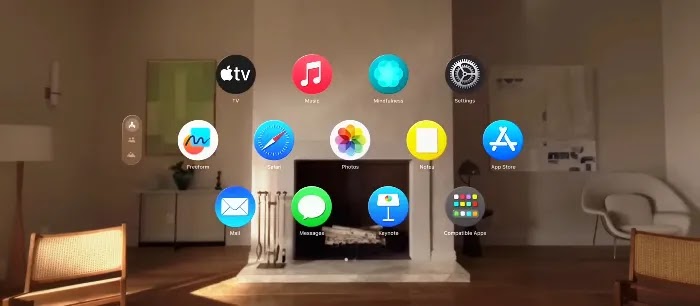
visionOS is Apple's spatial operating system built specifically from the ground up for Vision Pro, running thousands of familiar iPhone and iPad apps alongside brand-new spatial experiences. With a clean transparent interface controlled naturally by your eyes, hands, and voice, visionOS makes using a spatial computer feel as natural as picking something up with your hands.
Apple Vision Pro runs on visionOS, a completely new spatial operating system that Apple built entirely from scratch — not a modified version of iOS or macOS, but a whole new platform. It looks stunning: translucent floating windows that sit on top of your real environment, casting soft realistic shadows onto actual physical surfaces. Everything is designed to look like it belongs in your space.
visionOS supports hundreds of thousands of existing iPhone and iPad apps right out of the box. Major developers like Microsoft, Adobe, Disney+, and Zoom have all brought their apps to the platform, and more are arriving every month. If you've ever dealt with frustrating common computing issues on a traditional desktop or laptop, using visionOS feels refreshingly different — clean, intuitive, and gesture-first.
visionOS updates have added features like Guest Mode (let someone else try your headset safely), Travel Mode (optimized for use on planes and trains), improved hand gestures, and enhanced Mac Virtual Display options. The platform genuinely improves with every update Apple pushes out.
15. Accessibility for Everyone
Apple has always been a leader in making technology accessible to all people, and Vision Pro carries that tradition forward in a big way. It comes packed with accessibility features that make it genuinely usable for people with a wide range of abilities and needs.
VoiceOver for visionOS reads out on-screen content in full spatial context — not just flat text but the positions of elements in your actual space. AssistiveTouch lets users with motor difficulties control the headset using just a wrist movement or hand clench gesture. Zoom magnification, closed captions, and audio descriptions are all supported across apps and media. You can also customize controls and settings in detail to fit your specific comfort and ability level.
Apple's approach ensures that Apple Vision Pro accessibility features aren't an afterthought — they're built right into the core of the product. Whether you have low vision, hearing differences, or motor challenges, Vision Pro is genuinely designed with you in mind.
16. Open Developer Platform
Apple Vision Pro isn't just a consumer product — it's a full development platform. Apple opened it up with the visionOS SDK, giving developers the tools to build brand-new spatial apps for Apple Vision Pro using familiar frameworks like Xcode, Swift, SwiftUI, ARKit, RealityKit, and Metal. If you know how to build iOS apps, you're already most of the way to building for Vision Pro.
The app ecosystem is growing fast. From spatial gaming and medical visualization to virtual real estate tours and remote training simulations, developers are creating entirely new kinds of experiences. Businesses that understand the importance of building a memorable and recognizable digital brand are already staking out their presence on this new platform — because the early movers always have the biggest advantage.
Apple also partnered with Unity to bring its powerful 3D game engine fully to visionOS, meaning thousands of existing games and experiences can be brought to Vision Pro without rebuilding from the ground up. The Vision Pro open platform is one of its most future-facing features.
17. Future-Proof Technology
Apple Vision Pro isn't just a headset you buy and shelve after two years. It's a long-term platform built for continuous growth. Apple has committed to regular visionOS software updates that consistently bring new features, performance gains, and fresh experiences. The device you buy today will be measurably better six months from now — just like your iPhone or Mac gets better over time.
The hardware itself has serious runway ahead of it. The Apple M2 chip inside Vision Pro is the same processor that powers Apple's laptops — meaning it's not going to feel slow or outdated anytime soon. Reports already point to a next-generation Vision Pro in development with advanced sensors, a lighter frame, and a more accessible price point. Developers and brands that understand how to build strong digital authority and long-term online reach are already positioning themselves on this spatial platform for the future.
Apple Vision Pro future updates are expected to bring deeper AI integration, improved Persona quality, better battery performance, and broader international app support. This is a device that grows with you — and with the entire world.
Video: Introducing Apple Vision Pro Features
Apple Vision Pro Features Explained: Everything You Need to Know Before BuyingKnow all 17 Apple Vision Pro features in detail — from its 23-million-pixel micro-OLED display and spatial audio to Optic ID security, hand tracking, FaceTime Personas, visionOS apps, Mac Virtual Display, and the powerful Apple M2 chip. Your complete guide to the world's first spatial computer. The era of spatial computing is here, where digital content blends seamlessly with your physical space. So you can do the things you love in ways never before possible. This is Apple Vision Pro. Learn More: Introduction, Photos and videos, Entertainment, FaceTime, Technology, Ending
Pros & Cons of Apple Vision Pro
Pros
Places digital content directly inside your physical world, creating a completely new way to interact with apps, entertainment, and communication.
Lets users control everything simply using their eyes, hands, and voice — no controllers needed.
Features custom micro-OLED displays with a combined 23 million pixels — more than a 4K TV per eye — for outstanding visual clarity.
Supports Personalized Spatial Audio that is literally calibrated to your specific ear shape.
Apple's first 3D camera that captures spatial photos and spatial videos you can relive inside the headset.
Designed for extended comfort with ZEISS Optical Inserts available for prescription eyeglass wearers.
Runs visionOS, a completely new spatial operating system with a fast-growing app library.
Compatible with hundreds of thousands of existing iPhone and iPad apps on day one.
Features Optic ID — the most advanced biometric headset security system ever built.
Hot-swappable external battery lets you carry a spare and switch without powering down.
Cons
Premium price starting at $3,499 puts it out of reach for many everyday consumers right now.
External battery provides only about 2 to 2.5 hours of wireless use on a single charge.
The headset design, while well-engineered, is still bulky compared to regular glasses or sunglasses.
May cause eye fatigue or discomfort for some users during very long sessions.
ZEISS Optical Inserts for prescription users cost extra and require a separate order.
FaceTime Personas, while impressive, can still look slightly uncanny in certain lighting conditions.
Faces strong competition from more affordable headsets like the Meta Quest 3 and Sony PlayStation VR2.
Frequently Asked Questions About Apple Vision Pro
Got questions about the Apple Vision Pro spatial computing headset? You're not alone. Whether you want to know about Apple Vision Pro price, battery life, how visionOS works, or whether it supports your glasses, we've got all the answers below. Here are the 10 most common questions people ask about Vision Pro — answered clearly, quickly, and honestly.
What does the Apple Vision Pro do?
Apple Vision Pro is a spatial computing headset that places digital content directly inside your physical world. It creates a new way to interact with apps, entertainment, photos, videos, and communication. You control everything using your eyes, hands, and voice — no keyboard, mouse, or controller needed. It also lets you choose from a range of digital environments that change the look of your space.
Does Apple Vision Pro work with glasses?
Apple Vision Pro works with prescription glasses through ZEISS Optical Inserts — custom-made lenses that magnetically clip inside the headset. Standard glasses do not fit inside the headset itself. The Light Seal conforms to your face to block stray light, and the fit dial lets you adjust Vision Pro precisely to your head shape for comfort.
What resolution is Apple Vision Pro?
Apple Vision Pro uses a pair of custom micro-OLED displays with a combined total of 23 million pixels — more pixels per eye than a 4K TV. This delivers exceptional clarity and detail for any content. The displays also support high dynamic range (HDR) and wide color gamut (WCG) for vivid, true-to-life colors and deep, realistic contrast.
Is Apple Vision Pro augmented reality or virtual reality?
Apple Vision Pro is primarily an augmented reality (AR) device, but it can also switch to full virtual reality (VR) using the Digital Crown dial. In AR mode, digital content overlays your real physical world. In VR mode, you are fully surrounded by a digital environment. Apple calls this combination "spatial computing" — a step beyond traditional AR or VR alone.
What is the Apple Vision Pro price?
Apple Vision Pro starts at $3,499 in the US market. The price includes the headset, the external battery pack, and a one-year warranty. Additional accessories like ZEISS Optical Inserts and extra headbands are available at additional cost. Apple has also expanded availability to multiple countries since its initial US launch.
What is Optic ID on Apple Vision Pro?
Optic ID is Apple Vision Pro's biometric security system that uses your iris pattern to unlock the headset and authorize payments — similar to how Face ID uses your face or Touch ID uses your fingerprint. It works using infrared cameras and LED lights inside the headset and completes authentication in under a second. All Optic ID data is stored encrypted on the device and never shared with Apple.
Is Apple Vision Pro a computer?
Apple describes Vision Pro as the world's first spatial computer. It runs visionOS, a full spatial operating system powered by the Apple M2 chip — the same processor used in Apple laptops. It can also connect wirelessly to a Mac and display its screen as a large virtual monitor inside the headset, making it a genuinely powerful productivity device.
Is Apple Vision Pro wireless?
Apple Vision Pro is wireless in use, but it connects to an external battery pack via a magnetic cable. The battery provides up to 2.5 hours of wireless use on a single charge. For extended sessions, you can plug the battery pack into a power outlet while wearing the headset for unlimited use. The battery is also hot-swappable, so you can carry a spare and switch without powering off.
What apps are available on Apple Vision Pro?
Apple Vision Pro supports hundreds of thousands of existing iPhone and iPad apps through the visionOS App Store. It also has a growing library of apps built specifically for spatial computing, including Microsoft Office apps, Disney+, Adobe tools, Zoom, and many spatial games and 3D experiences. Developers can build new apps using familiar tools like Xcode, Swift, ARKit, and RealityKit.
Does Apple Vision Pro have a Travel Mode?
Yes, Apple Vision Pro includes Travel Mode, which was added through a visionOS software update. Travel Mode is specifically designed for use on planes and other moving vehicles. It adjusts how the headset anchors virtual windows and content so they stay stable even when the environment around you is physically moving. This makes it practical and comfortable to use Vision Pro during long flights or train journeys.
Bottom Line: Is Apple Vision Pro Worth It?
The Apple Vision Pro spatial computing headset is, without question, the most technically advanced personal device ever built by any company. It packs 23 million pixels, a dual-chip architecture, precise eye and hand tracking, Personalized Spatial Audio, a 3D camera, and a completely new operating system into a single wearable product. No other device on the market does what Vision Pro does — and it does it with the kind of quality and polish that only Apple manages at this level.
Is it perfect? Not yet. The battery life limitation, the premium price, and the still-growing app ecosystem mean it's not the right product for everyone right now. But for creative professionals, remote workers, tech enthusiasts, and early adopters, the Apple Vision Pro features and specifications represent a genuine look at where personal computing is heading for all of us. Every major software update makes it better, and every new app added to visionOS makes it more useful.
The question isn't really whether Apple Vision Pro is worth buying today — it's whether you want to be part of where computing is going next. If the answer is yes, Vision Pro is your ticket. And if you're thinking about all the profitable digital opportunities that new technology platforms create, remember that every great platform — the smartphone, the tablet, the smartwatch — rewarded the people who paid attention earliest.
Read Online & Share
Scan this QR code with your phone's camera to instantly open the live version of this article.
If you enjoyed this article, please share it with your friends and help us spread the word.
We are a professional review site that operates like any other website on the internet. We value our readers' trust and are confident in the information we provide. The post may contain some affiliate/referral links, and if you make a purchase through them, we receive referral income as a commission. We are unbiased and do not accept fixed marketing articles or fake reviews. We thoroughly test each product and only give high marks to the very best. We are an independent organization and the opinions/views/thoughts expressed here are our own.
Privacy Policy
All of the ProBlogBooster ideas are free for any type of personal or commercial use. All I ask is to keep the footer links intact which provides due credit to its authors. From time to time, we may use visitors/readers, information for distinct & upcoming, unanticipated uses not earlier disclosed in our privacy notice. If collected data or information practices changed or improved at some time in the future, we would post all the policy changes to our website to notify you of these changes, and we will use for these new purposes only data collected from the time of the policy change forward. If you are concerned about how your information is used, you should check back our website policy pages periodically. For more about this just read out; Privacy Policy
Boost your WhatsApp experience by editing sent messages within 15 minutes, and much more like hiding your "last seen" from specific people, and using "view once" for private media. Find out most essential tips including locking your chats with biometrics, using bold/italics texts for formatting, sharing live location, and creating the chat shortcuts for quick access.