Beat Blogging Competitors with Schema, Tables & Structured Data
Vinayak SP
13/04/2024
Yes, If you have been wondering about a way to actually overtake your competitors and steal the traffic from organic searches, I have come up with a nice trick to do so. It is highly competitive these days to successfully rank your website on the first page for a keyword difficulty of more than 40. But for the keywords, you are already ranking on the first page and still struggling to get more traffic, what about them?
Wining Blogging Competitors —
More than 55% of users click the first search result as they believe Google has brought the best resource for them. And if you rank in the second or third position, there is less possibility for your site links to get clicks than the website ranking in the first position.
Interesting? Right? Follow the page.
In the competitive blogging world of online search, earning higher rankings and driving more traffic to your website is important for success. Fortunately, there are powerful SEO techniques that can help you outrank your rivals and attract a larger audience. Explore the SEO powerhouses of schema, tables, and structured data. By using their potential, you can dominate search results and skyrocket your website's traffic.
Structured data is a standardized format for providing information about a page and classifying its content. Schema, on the other hand, is a specific type of structured data vocabulary that is used to provide additional context and meaning to content on a website.
Schema and structured data have become increasingly important for websites in recent years.
By implementing structured data and schema on your website, you can enhance the user experience and help search engines better understand your content.
The advantages of structured data
Schema markup language and structured data help search engines to know and understand your content better. This results in rich snippets that have a higher click-through rate.
From the recent Google Algorithm updates it is seen that Google considers structured data as one of its ranking factors, which helps improve your search rankings of long-tail blog keywords and informative content.
As you know, search engines use algorithms to sort through billions of web pages and display the most relevant results for a specific search query. So the pages with structured data help people find the best information and content they looking for.
When you use structured data, you have control over what information appears on search engine results pages. This means that you can make sure that the right information is displayed to people who are searching for it.
In short; the benefits of using schema and structured data include improved search engine visibility, increased click-through rates, and the ability to provide more relevant and accurate information to users.
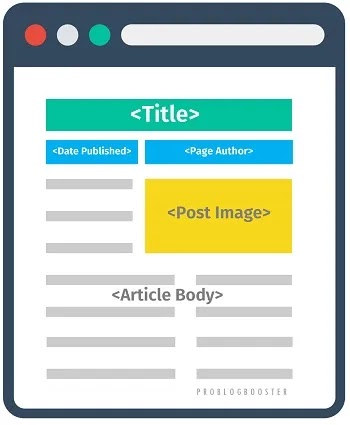
Adding Article Structured Data
Adding Article Structured Data
Here you are going to learn to structure your every post, just like the picture shows by using 'Article' data.
You must be thinking about how to do this.
Here the importance of HTML markup comes into existence. This kind of snippet is not possible from manual actions. However, you can structure your web page in such a way that a Google bot can show it.
Use proper headings
Images with ALT tags
Hierarchy of headings, sub-headings
Adding the author of the webpage
With the structured data added to each page, you will also rank on the 1st page, 1st position, even for the keyword listed somewhere in the 5th position. And this is how using this kind of structured snippet helps you steal most of the traffic from Google.
Add Article structured data in your blog HTML:
You can structure your content in such a way that it becomes easy for Google bot to understand and consider it the perfect choice for that featured snippet.
Add the following 'Article' structured data in your HTML:
After you add your schema tags, you can check if they work correctly by using the Rich Results Tester by Google Search Console. Just enter your URL and choose to test on mobile or desktop. The tester will show you how your schema data appears on Google, any issues that may affect it, and if you qualify for rich snippets.
Using Tables To Have More SEO Attention
Now this one also helps me attract more visits using tables in my content.
Google does the rest.
Why use Tables?
Tables make it easy to understand things.
When you are looking to explain something insightful, statistical, or structured, you may need the help of tables. Just like my teachers used to teach in the classroom on the whiteboard using tables.
Advantages of using tables on web pages:
It simplifies the information
Not just Google, users also love data
When a person is not willing to read the monotonous article anymore, He may be interested to read insights.
Our mind is powerful enough to understand through tables rather than paragraphs.
Add table schema in your blog post:
<div itemscope='itemscope' itemtype="https://schema.org/Table">
  <h2 itemprop="about">List of AdSense Alternatives</h2>
  <table>
    <tr><th>Advertising Network</th><th>Type</th></tr>
    <tr>
      <td>Ezoic</td>
      <td>AI-Based Ad Optimization</td>
    </tr>
    <tr>
      <td>Media Net</td>
      <td>Native Banner Ads</td>
    </tr>
    <!-- And so on -->
  </table>
</div>
The problem with adding tables in your content is – Responsiveness. You can overcome this issue by using responsive blogger CSS which lets you add tables to your content without coding. Just shortcodes and done.
You can use your custom styles for tables where you can add styling attributes like column alignment, column width, and table title.
Aggregated Star Ratings to Get Rich Snippet
The review and rating system is created to help visitors quickly know ratings and reviews of a website, web page, service, product, or company. It can help increase the trust of every visitor, which in turn can lead to boost sales performance specially for eCommerce, and increased domain authority in the case of bloggers.
The rating structured data is designed to be straightforward and easy to use, providing valuable information to customers. By using this method, visitors can gain a better understanding of the quality of the products or services offered, which can help them make informed decisions.
I hardly have seen a Review post ranking at the first position on Google without having Ratings Schema Markup.
For WordPress, while you may find it difficult to do it with code, it is easier to do with Schema Rating WordPress Plugins.
I personally using to successfully implement the star ratings in my reviews. It not only helps me make more money by adding affiliate links on the button but also lets me add those stars in Google SERPs.
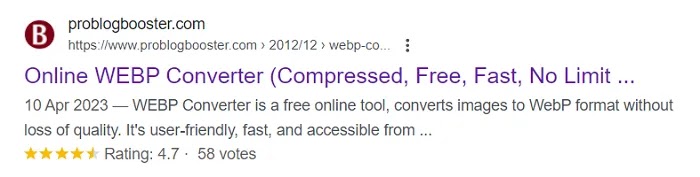
I have seen some people not getting those stars in SERP even after trying every possible way to get them. You need to follow detailed page To Get Aggregated Star Ratings In Google Search Results [SERP] | Install Review and Rating System to Rich Snippet. When creating a schema, you can rate your page in the Review section by specifying a Rating.
Aggregated Star Ratings to Get Rich Snippet Preview
Above picture shows, how it looks on the website and a star rating on Google is like a guarantee after using this code.
Bottom Line
I have added most of my tricks to hack the search traffic and growth of my blog. Adding tables can not only help you rank higher but also help your readers understand the data listed on your website.
And adding Article schema and star rating structured data to each page will impress search bots causing faster crawling and improving search ranking high in SERP.
Read Online & Share
Scan this QR code with your phone's camera to instantly open the live version of this article.
If you enjoyed this article, please share it with your friends and help us spread the word.
We are a professional review site that operates like any other website on the internet. We value our readers' trust and are confident in the information we provide. The post may contain some affiliate/referral links, and if you make a purchase through them, we receive referral income as a commission. We are unbiased and do not accept fixed marketing articles or fake reviews. We thoroughly test each product and only give high marks to the very best. We are an independent organization and the opinions/views/thoughts expressed here are our own.
Privacy Policy
All of the ProBlogBooster ideas are free for any type of personal or commercial use. All I ask is to keep the footer links intact which provides due credit to its authors. From time to time, we may use visitors/readers, information for distinct & upcoming, unanticipated uses not earlier disclosed in our privacy notice. If collected data or information practices changed or improved at some time in the future, we would post all the policy changes to our website to notify you of these changes, and we will use for these new purposes only data collected from the time of the policy change forward. If you are concerned about how your information is used, you should check back our website policy pages periodically. For more about this just read out; Privacy Policy
Boost your WhatsApp experience by editing sent messages within 15 minutes, and much more like hiding your "last seen" from specific people, and using "view once" for private media. Find out most essential tips including locking your chats with biometrics, using bold/italics texts for formatting, sharing live location, and creating the chat shortcuts for quick access.